Pressure damage LCD issues represent a unique and pervasive threat to modern devices. This damage, distinct from dramatic impact cracks, manifests as subtle screen discoloration—often appearing as persistent white or yellowish blotches that obscure your display. Understanding this specific failure mode is crucial, as it frequently voids standard warranties and leads to costly out-of-pocket repairs. This comprehensive guide provides a clear, step-by-step approach to diagnosing the problem, evaluating your repair options, and implementing effective strategies to shield your screens from harm.
1. What Does Pressure Damage LCD Look Like? A Diagnostic Guide
Accurate diagnosis is the critical first step when you suspect a screen issue. True pressure damage LCD displays exhibit a specific set of visual symptoms that differentiate them from other failures like dead pixels or backlight bleed. Recognizing these signs can prevent misdiagnosis and guide you toward the correct solution.
The hallmark of this damage is localized, soft-edged discoloration. In advanced cases, the affected area may show a splotchy pattern resembling a bruise, or even dark blobs indicating severe internal layer displacement or liquid crystal leakage. It is a permanent physical deformity within the screen’s layered structure.
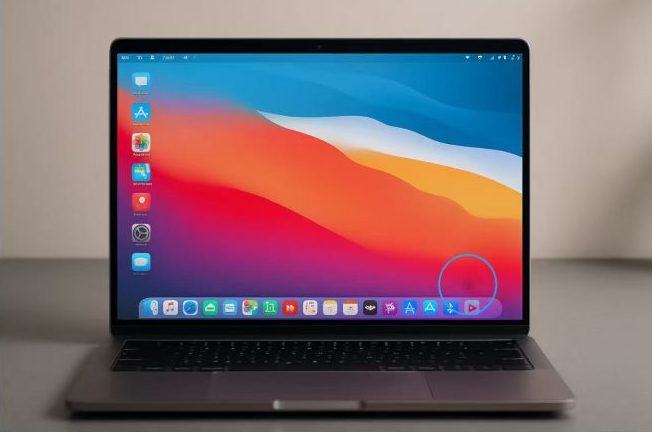
For instance, a common real-world case involves a graphic designer who stored her laptop in a messenger bag with a compact camera. The constant pressure from the camera lens against the closed lid created a perfect circular pressure damage LCD blotch right in the center of her screen. To self-diagnose, clean your screen thoroughly and view it against pure white, black, and red backgrounds. If the irregular spot remains fixed in place and changes hue slightly against different colors, you are almost certainly dealing with pressure damage LCD and not a software glitch.
2. Pressure Marks on LCDs: How Everyday Actions Cause Damage
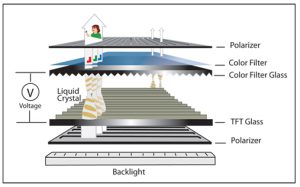
To prevent a problem, you must know its origin. Pressure marks on LCDs are fundamentally a physical failure of the screen‘s delicate internal sandwich structure. The LCD panel comprises multiple layers, including polarized filters, a liquid crystal grid, and color filters. Excessive, focused pressure pinches these layers, damaging the microscopic liquid crystal cells or causing the layers to separate permanently.
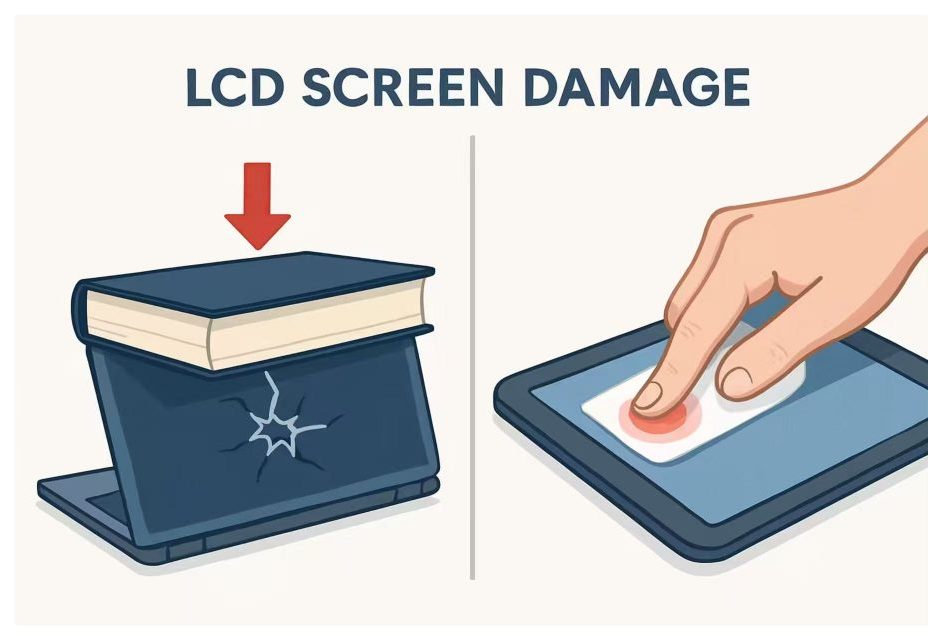
The most frequent culprits are daily habits. Placing a heavy object like a phone or a hardcover book on a closed laptop is a prime cause of pressure marks on LCDs. Similarly, carrying a laptop in a bag that’s too tight or packed with other items applies sustained pressure. For tablets and phones, sitting on the device or cramming it into a back pocket is a classic scenario that leads to these telltale marks. Even “innocent” actions, like pressing too hard during screen cleaning, can contribute over time.
3. Realistic Repair Options: Can You Fix Pressure Damage LCD Issues?
When faced with a damaged screen, the immediate question is about repair feasibility. So, can you fix pressure damage LCD problems? The honest answer is limited. For a very minor, freshly formed pressure mark, completely removing the source of pressure and powering the device off for 48-72 hours might allow the liquid crystals to partially reflow, diminishing the spot’s visibility. This is not a reliable LCD screen repair method and often yields no improvement.
In over 95% of cases, the only permanent fix pressure damage LCD solution is a complete display panel replacement. The internal layers are physically deformed and cannot be “un-crushed.” A certified technician will disassemble the device and install a new screen assembly. This process is technically complex and costly, often ranging from $200 to $600 depending on the device model. Before proceeding, obtain a professional diagnosis to confirm the damage is pressure-related and not a failing component covered under warranty. Attempting DIY fixes, such as applying suction or pressing on the spot, will almost certainly worsen the LCD pressure damage, turning a repairable situation into a total loss.
4. Building a Shield: How to Proactively Prevent LCD Pressure Damage
Given the high cost and inconvenience of repair, a proactive defense is your most valuable tool. To successfully prevent LCD pressure damage, you must adopt a mindset of conscious protection for your device’s most vulnerable component. This protective thinking can extend from personal usage habits all the way to industrial-grade source design.
Your first line of defense is investing in the right armor. Use a well-fitted, hard-shell case for your laptop and a rigid folio case for your tablet. These create a crucial buffer zone. For transport, dedicate a padded, snug compartment in your bag—never let your laptop share space with loose, hard objects like chargers, pens, or keys.
Second, enforce strict handling rules. Always open and close laptops using both hands at the center to avoid twisting the lid and panel. Establish a firm household or office policy: Nothing ever gets placed on top of a closed laptop, tablet, or phone screen.
For Industrial-Grade Applications: Prevention Starts at the Source
The most robust approach to prevent LCD pressure damage and impact is to integrate protection directly into the product’s design from the outset, a principle exemplified by high-standard industrial displays.
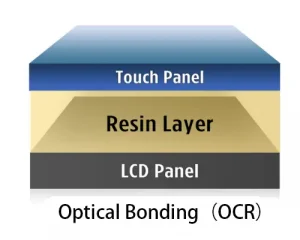
For instance, devices designed to meet the IK10 rating—the highest level of mechanical impact protection—employ strategies directly relevant to resisting pressure. These include using significantly thicker cover glass (often 6mm or more) to distribute force over a larger area, and employing optical bonding techniques. This process fills the air gap between the cover glass and the LCD with a clear adhesive, creating a monolithic, rigid structure that is far less susceptible to the layer separation and liquid crystal distortion caused by point pressure.
While consumer devices aren’t built to IK10 standards, the principle remains valid: structural integrity is key. By integrating the simple, non-negotiable habits mentioned above, you systematically simulate a more robust “design” for your personal devices, helping you prevent LCD pressure damage and avoid the frustrating and expensive search for a repair down the line.
IK Protection Rating Guide for Industrial Display Applications
| IK Rating | Protective Capability (Impact Energy) | Typical Application Scenarios |
|---|---|---|
| IK06 – IK07 | Basic Protection (Resists 1-2 joules) |
Controlled Indoor Environments: Light factory automation equipment, laboratory instruments, indoor control panels, office devices. Where risk is limited to minor accidental bumps. |
| IK08 | Medium Protection (Resists 5 joules) |
Semi-Public / Indoor-Outdoor Areas: Self-service kiosks, vending machines, industrial touch monitors in warehouses, equipment subject to occasional knocks. |
| IK09 | High Protection (Resists 10 joules) |
High-Traffic Public Environments: Electric Vehicle (EV) charging stations, public ATMs, transportation ticketing terminals, hospital information screens. Withstands higher accidental impact or rough use. |
| IK10 | Highest Vandal-Proof Protection (Resists 20 joules) |
Unattended or High-Risk Areas: Outdoor industrial HMIs, vandal-proof public kiosks, construction site equipment, correctional facility devices. Essential where deliberate vandalism or severe accidental impact is a concern. |
5. The Cost-Benefit Analysis: Repair or Prevent LCD Pressure Damage?
Confronting a damaged screen forces a financial decision. Weighing the quoted LCD screen repair cost against your device’s current market value and age is essential. For a device older than three years, a repair costing more than half its replacement value is often not economical. However, for a newer, high-end machine, professional repair is usually smarter than buying new.
Ultimately, the analysis overwhelmingly favors prevention. The cumulative cost of a quality protective case ($30), a well-padded bag ($60), and mindful habits is a trivial one-time investment compared to a single LCD screen repair bill that often exceeds $300. The data is clear: the behaviors that cause LCD pressure damage are predictable and controllable. By choosing to invest in protection and adopt careful handling, you are not just avoiding a repair; you are preserving the clarity, functionality, and resale value of your device for its entire usable life. Let this be the guide that turns reactive frustration into proactive, lasting screen care.