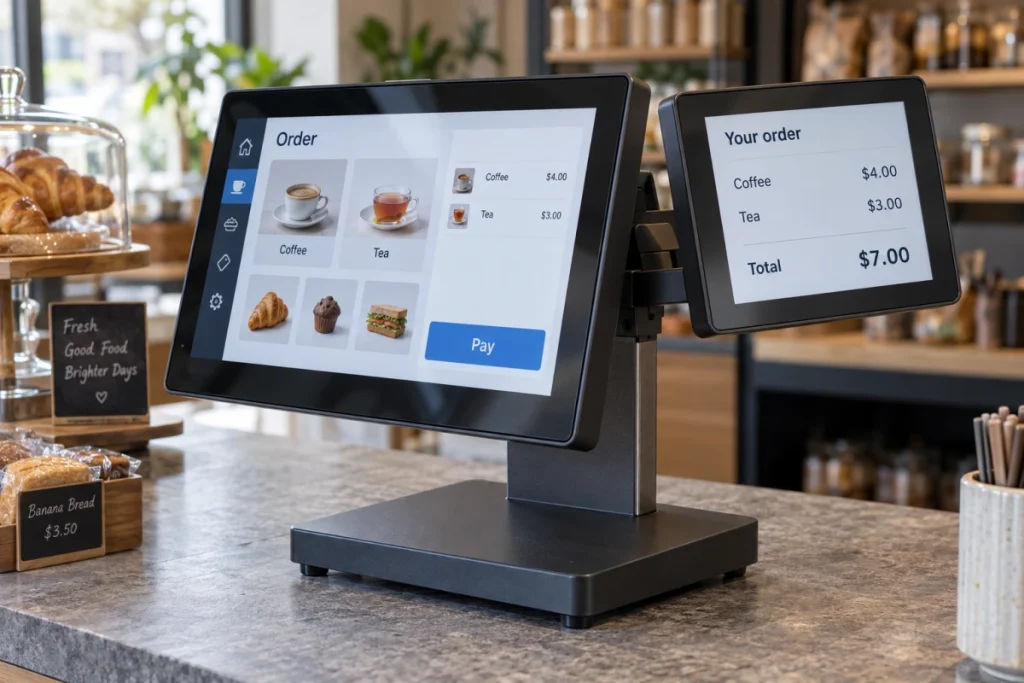
Dual independent display lets one motherboard(Embedded SBC) show different content on two screens at the same time. On a point-of-sale (POS) terminal, the operator might see order controls while the customer sees the items and total. Rocktech’s PX30 and RK3576 platform motherboards support this function. Which platform fits a particular device depends on what those two screens will show, how users interact with them, and the software running behind them.
What Is Dual Independent Display?
Connecting a second screen does not always produce a second, independent view. Mirror mode repeats the same content on both screens. An extended desktop spreads a workspace across them. For a dedicated terminal, the application assigns a particular view to each screen: perhaps controls on one and a status dashboard on the other. An extended desktop or another display-management approach can support that arrangement.
“Supports two displays” therefore leaves quite a lot unanswered. Does the second screen accept input? What appears on it during startup? Writing down the intended content and behavior for each screen gives the hardware and software teams a shared requirement to work from.
Dual independent display requires support from both the hardware and software. Two connectors on a board may share hardware resources, limiting how they can be used together. Even with a suitable pair of outputs, the operating system must make both displays available to the application.
Where Two Screens Need Different Content
A second screen earns its place when someone needs information that should remain visible while the main interface changes. These examples show how the work can be divided.
| Application | Main screen | Second screen | Design priority |
|---|---|---|---|
| POS terminal | Order entry and operator controls | Items, totals, and transaction status | Keep customer information aligned with the current order |
| Self-service kiosk | Service selection and user interaction | Instructions or service information | Keep guidance readable while the main interface changes |
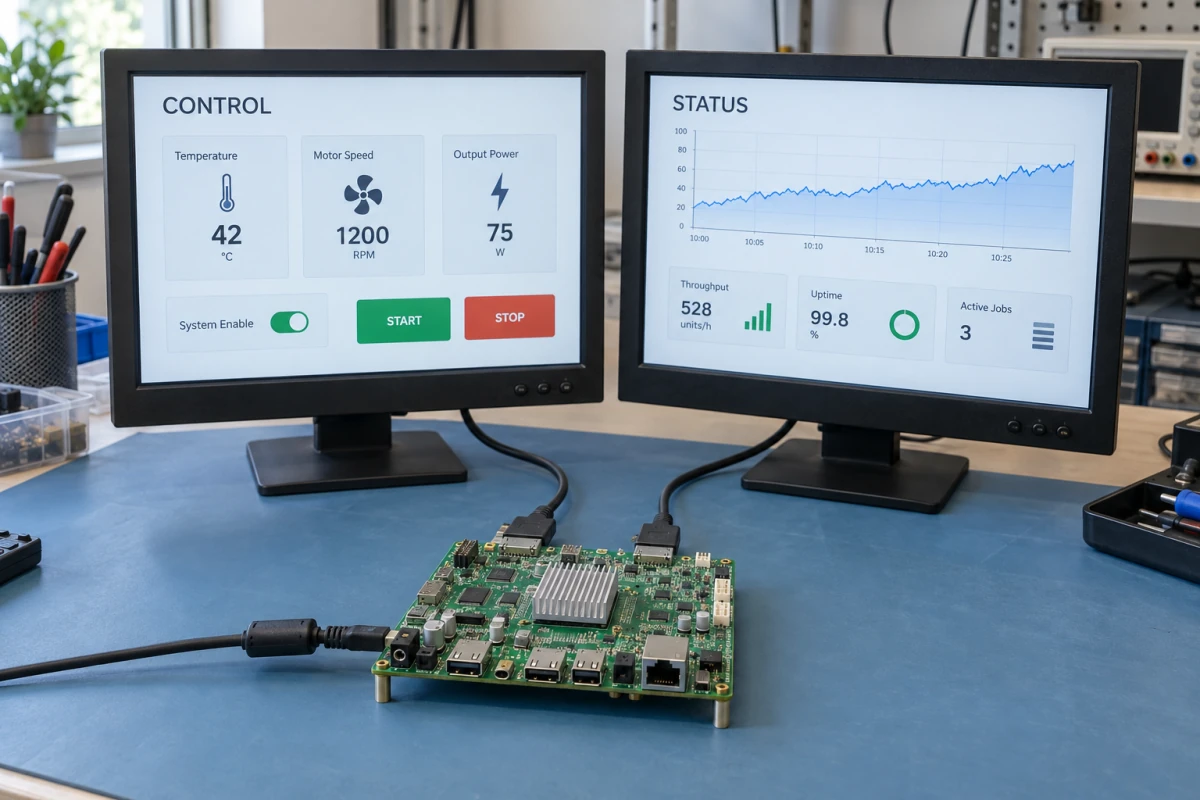
| Industrial equipment | Machine settings and operator input | Production status and process data | Make stale or unavailable data clearly identifiable |
On a POS terminal, dual independent display allows the software to keep administrative controls on the operator’s screen. The less obvious work is deciding what the customer sees when an order is cancelled or the application restarts. Moving a window onto the customer screen is only one part of that behavior.
Industrial equipment raises another consideration: both screens still rely on the same motherboard. A board failure can take both out of service. Showing separate content provides no hardware redundancy, so the response to a system failure needs its own design decision.
Choosing a PX30 or RK3576 Motherboard for Dual Displays
Rocktech offers PX30 and RK3576 motherboard options for dual independent display projects. The next step is to match a specific board and firmware to the intended panels. A processor’s display specifications describe its capabilities; the board design determines which interfaces are available for connecting panels.
Match the Board to Both Screens
Each panel needs its own specification: model number, interface, native resolution, refresh rate, and mounting orientation. With those details in hand, establish which outputs can run together. Rockchip’s PX30 documentation, for example, describes parallel RGB operating alongside either MIPI DSI displays or LVDS displays. That does not mean every PX30 board exposes those connections or allows any two listed interfaces to operate simultaneously.
The electrical details matter just as much. A dual display motherboard and panel can have connectors that look compatible but use different pin assignments or supply requirements. Display timing and backlight control also need to match. If an adapter or bridge is required, include it in the configuration used for validation.
When the second screen stays dark, start with panel power and the backlight, then move to output settings and display timing. Once both screens are available to the operating system, check which output the application sends its content to. This helps separate a connection problem from content being sent to the wrong output.
Check Software and Touchscreen Behavior
A demonstration is most useful when it runs the operating system and firmware intended for the product. Android’s Presentation API lets an application put a dedicated view on a suitable secondary display. Running a separate application there brings additional launch and platform requirements. Under Linux, the graphics stack and application framework determine output configuration and window placement.
If tapping the customer screen operates the main interface, input mapping is the first place to look. Each touch device needs to be associated with the correct display, with coordinates that follow its orientation. A quick test near all four corners helps reveal a mapping or rotation problem before assuming the panel itself is faulty.
Compare Platforms Against the Real Workload
For a control interface paired with a simple information screen, PX30 and its four Cortex-A35 cores are a reasonable starting point for evaluation. More demanding graphics, video, or concurrent tasks make RK3576, with its Cortex-A72 and Cortex-A53 cores, worth considering.
There is also a distinction between panel refresh rate and application frame rate. In a dual-screen display system, a 60 Hz panel may refresh regularly while the application produces fewer than 60 new frames per second. Video decoding adds only part of the load: the system also has to compose the interface and send each view to its output.
For a meaningful dual independent display test, run the actual interface, media, and background services together. Two static images reveal little about how the device will respond during use. The following checks cover behavior that a simple display demonstration can miss:
- Content assignment: Each view should return to its intended screen after startup and an application restart.
- Responsiveness: Use the main interface while the second screen updates or plays the intended media.
- Recovery: Test sleep and wake if the product uses them, plus reconnection where the interface supports it.
- Sustained operation: Watch frame stability and touch response after the enclosed system reaches operating temperature.
Frequently Asked Questions
Can the two displays use different resolutions and orientations?
Yes, provided the selected outputs and software support that combination. Treat each screen’s resolution, refresh rate, and orientation as a separate requirement. The layouts need attention too: stretching or shrinking the same interface can distort proportions or leave text too small. One advertised maximum resolution does not establish what both outputs can do together.
Can both displays support touch input?
Both can support touch if the board connections, drivers, and operating system accommodate the two touch devices. Support for dual independent displays does not automatically include support for two touch devices. Where two people will use the screens at once, test application focus and concurrent input as well. Correctly mapped coordinates are only part of making both interactions work together.
What information should I provide when selecting a dual-display motherboard?
Send both panel model numbers, interfaces, and timing requirements, along with the operating system and the content planned for each screen. Add touch requirements, video formats, background tasks, enclosure constraints, and startup behavior. For a Rocktech PX30 or RK3576 enquiry, this gives the team a basis for selecting a board configuration and preparing a relevant demonstration.
A useful brief for a dual independent display project describes what each screen should show and how it should respond during startup, interaction, and recovery. Bring that brief, the intended panels, and the application to the PX30 or RK3576 evaluation. The result should show whether the device can keep both views working as intended while handling its expected workload.