
Finding the perfect display starts with one fundamental question: how to find PC monitor size accurately? Whether you’re a technician sourcing a replacement panel, an engineer integrating a display into a new device, or a procurement manager ensuring compatibility, getting the size right is the critical first step.
But the journey doesn’t end with a measurement. The true goal is to select a display where the physical dimensions work in perfect harmony with core performance specifications to meet the exact demands of your application—be it a rugged factory floor HMI, a sunlight-readable outdoor kiosk, or a custom embedded system.
This guide will first walk you through the definitive methods to determine your monitor’s size. Then, we’ll decode the key specifications that transform a simple screen into the right solution for your project. Let’s begin.
Part 1: How to Find PC Monitor Size: Two Proven Methods
Accurately determining your screen size is straightforward if you use the right method. For professionals, precision is non-negotiable, as an error here can lead to costly mismatches in custom enclosures or assembly lines.
Method 1: Use Your Model Number (The Best Way to Find PC Monitor Size)
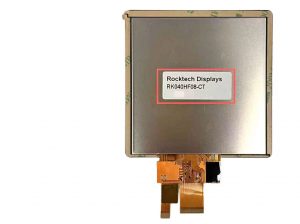
The most reliable and authoritative method in how to find PC monitor size is to locate your monitor model number. This alphanumeric code is the unique fingerprint of your display, typically found on a label on the back of the unit, within the on-screen display (OSD) menu, or in your computer’s system information.
Why is this the gold standard? Searching this model number online will lead you directly to the manufacturer’s official specification sheet. This document doesn’t just confirm the exact diagonal PC monitor size; it lists every critical detail, including the native screen resolution, supported refresh rate, and the underlying panel technology. For industrial and procurement purposes, relying on the monitor model number eliminates all guesswork and provides the data needed for a perfect replacement or a technically sound upgrade path.
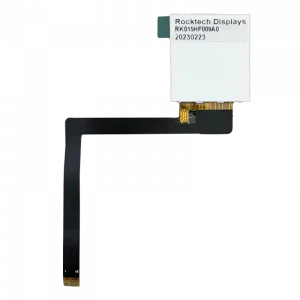
Method 2: Physical Measurement (The Direct Way to Find Your PC Monitor Size)
If the monitor model number is missing or unreadable, the universal fallback is physical measurement. You’ll need a soft tape measure. Ensure the screen is off to avoid glare, then measure the distance from the bottom-left corner to the top-right corner of the screen’s active viewing area only, excluding the bezel. The length in inches is your screen size. Remember that 1 inch equals 2.54 centimeters for conversion.
It’s crucial to note that while this tells you the “canvas” size, it lacks context. Knowing you have a 10.1-inch display is like knowing you need a 10.1-inch frame—it doesn’t tell you about the image quality it must hold. To choose a suitable successor, especially when considering industrial-grade or custom TFT displays, you must understand how this size interacts with other defining specifications.

Part 2: After You Find Your PC Monitor Size: Understanding Key Specifications
Successfully completing the task of how to find PC monitor size gives you a number. However, that number must be evaluated alongside three core technical pillars that define performance: clarity, motion handling, and image character.
1. Screen Resolution: Pairing Clarity with Your Monitor Size
Screen resolution (e.g., 1920×1080/FHD, 1280×800/WXGA) denotes the number of pixels horizontally and vertically. Its practical impact is best understood through Pixel Density (Pixels Per Inch, or PPI), which is determined by combining resolution with the physical PC monitor size you just found.
-
The Engineering Match-Up: A higher resolution on a given size yields a higher PPI, resulting in sharper text and finer graphic details. For instance, a 15.6-inch industrial HMI with Full HD (1920×1080) resolution offers excellent clarity for control interfaces. However, the same FHD resolution on a larger 21.5-inch panel would appear noticeably less sharp, where a higher resolution like 1920×1200 becomes necessary.
-
Industrial Application: This is why Rocktech offer a range of resolutions for a single size. A 7-inch IPS display with 280×1424 resolution might be perfect for a portable diagnostic tool where power efficiency is key, while their 10.1-inch display with 1280×800 resolution is ideal for industrial HMI devices, commercial terminals, and compact embedded systems.
2. Refresh Rate: Why It Matters Beyond Static Size
The refresh rate, measured in Hertz (Hz), indicates how many times per second the image on the screen updates. A standard display operates at 60Hz.
-
Why It Matters in Dynamic Environments: A higher refresh rate (e.g., 75Hz, 120Hz) produces significantly smoother motion, reducing blur in fast-moving visuals. This is critical not only for gaming but also for industrial applications involving real-time data monitoring, fast-scrolling logistics information, or high-speed mechanical visualization.
-
Beyond the Basic Spec: While many standard industrial TFT displays prioritize rock-solid stability at 60Hz, specific use cases demand more. For example, a high-brightness display used in a digital dashboard or surveillance system can benefit from a higher refresh rate to ensure every critical detail in a rapidly changing scene is captured without motion artifacts.
3. Panel Technology: The Quality Behind the Size
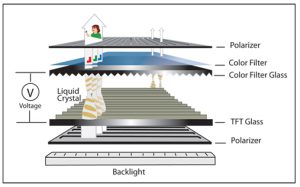
The panel technology is the physical engine that creates the image, directly governing color accuracy, contrast, viewing angles, and response time.
-
IPS (In-Plane Switching): The preferred choice for most professional applications. IPS panels offer superior color accuracy, consistency, and wide viewing angles (often up to 178 degrees). This makes them ideal for medical diagnostic equipment, color-critical design work, and public information kiosks where the screen must look consistent from various viewpoints. Most high-quality industrial TFT displays utilize IPS technology for this reliable performance.
-
VA (Vertical Alignment): Offers a middle ground with better contrast and color reproduction than older TN panels, and wider viewing angles. It’s a solid, cost-effective choice for general-purpose monitoring stations.
-
TN (Twisted Nematic): Known for fast response times but suffers from poor viewing angles and inferior color reproduction. Its use in modern industrial settings is limited to very specific, cost-sensitive applications.
Understanding panel technology helps you prioritize based on need: color fidelity for a diagnostic screen, wide viewing angles for a shared control panel, or specific performance for specialized environments.
Part 3: How to Apply Your PC Monitor Size Knowledge: Real-World Scenarios
Let’s synthesize this knowledge into practical application. The table below illustrates how the process that begins with how to find PC monitor size evolves into a holistic specification decision for different industrial challenges.
| Application Scenario | Key Priority | Recommended Specs Focus | Industrial Solution Path |
|---|---|---|---|
| Factory Floor HMI / Control Panel | Reliability, Longevity, Readability under harsh light | Size & Resolution: 10.1″ to 15.6″ with balanced resolution (e.g., 1280×800). Panel: Rugged IPS for wide viewing and stability. Brightness: 500+ nits to combat glare. |
Standard Industrial TFT Displays from a reliable manufacturer, designed for 24/7 operation and extended life cycles. |
| Medical & Diagnostic Device | Color Accuracy, Consistency, High Reliability | Panel: Medical-grade IPS with precise color calibration. Resolution: High PPI for detail (e.g., FHD on 12.1″). Customization: May require optical bonding to reduce glare. |
Fully custom TFT displays tailored to meet stringent medical safety standards and performance requirements. |
| Outdoor Payment Kiosk or Signage | Visibility in Direct Sunlight, Environmental Durability | Brightness: High-brightness displays (1000+ nits) are essential. Durability: Optical bonding, wide temperature range. Panel: IPS for consistent viewing in outdoor conditions. |
High Brightness TFT Series specifically engineered with enhanced backlights and protective treatments. |
| Compact Embedded Device | Space Constraints, Power Efficiency, System Integration | Size: Compact form factor (3.5″, 5.0″, 7.0″). Integration: Designed to pair seamlessly with Embedded SBCs (Single Board Computers). Customization: Tailored interfaces (FPC cables, connectors). |
Small-form-factor displays offered as part of a complete hardware solution with compatible embedded boards. |
The Customization Imperative
Often, the perfect specification combination doesn’t exist off-the-shelf. This is where partnering with an expert manufacturer becomes critical. True custom TFT displays can be engineered to overcome unique challenges:
-
Tailored Form Factors: Not just standard sizes, but custom dimensions, shapes, or ultra-thin profiles.
-
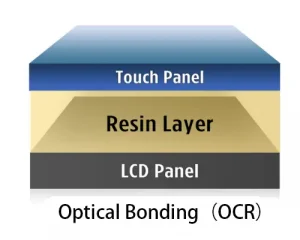
Enhanced Readability: Optical bonding—laminating the cover glass directly to the LCD—is a common custom request for high-brightness displays used outdoors, as it eliminates internal air gaps that cause glare and condensation.
-
Extreme Environment Operation: Developing panels that perform reliably in extended temperature ranges (e.g., -30°C to 85°C) for specialized industrial or automotive applications.
Conclusion
Mastering how to find PC monitor size is the essential first step in a larger, more important process: making an informed selection. By starting with the monitor model number for precision, you lay a solid foundation. By then interpreting how that size interacts with screen resolution, refresh rate, and panel technology, you gain the insight to choose a display that isn’t just physically compatible, but performance-optimized for your specific project.
Whether your needs are met by a dependable standard industrial TFT display or require a fully engineered custom TFT display solution, applying this knowledge ensures your next display is a strategic component that enhances functionality, reliability, and user experience.