
In display-related projects, one of the most common starting points is also the easiest to get wrong: screen size.
Whether you’re replacing an existing panel, designing a new enclosure, or checking compatibility during procurement, an inaccurate size can lead to mechanical conflicts, rework, and unnecessary delays.
Beyond the diagonal measurement itself, selecting the right display also requires matching the physical size with key performance parameters such as resolution, panel type, and application environment. This article explains how to correctly determine monitor size and what technical factors should be evaluated next to ensure the display fits both mechanically and functionally.
Part 1: How to Find Monitor Size: Two Common Ways Used in Practice
Accurately determining your screen size is straightforward if you use the right method. For professionals, precision is non-negotiable, as an error here can lead to costly mismatches in custom enclosures or assembly lines.
Method 1: Use Your Model Number (The Most Reliable Option in Production to Find Monitor Size)
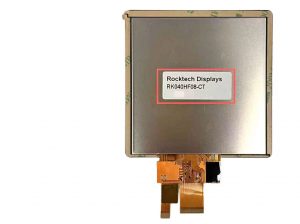
The most reliable and authoritative method in how to find monitor size is to locate your monitor model number. This alphanumeric code is the unique fingerprint of your display, typically found on a label on the back of the unit, within the on-screen display (OSD) menu, or in your computer’s system information.
Why is this the gold standard? Searching this model number online will lead you directly to the manufacturer’s official specification sheet. This document doesn’t just confirm the exact diagonal monitor size; it lists every critical detail, including the native screen resolution, supported refresh rate, and the underlying panel technology. For industrial and procurement purposes, relying on the monitor model number eliminates all guesswork and provides the data needed for a perfect replacement or a technically sound upgrade path.
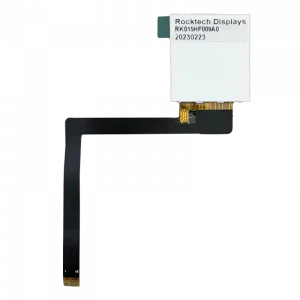
Method 2: Physical Measurement (The Direct Way to Find Your Monitor Size)
If the model label is missing or damaged, the only practical option is to measure the screen directly. Use a soft tape measure and make sure the display is powered off. Measure diagonally from the bottom-left to the top-right of the active display area, excluding the bezel. The measured diagonal in inches represents the screen size (1 inch = 2.54 cm).
This measurement confirms the physical size only. It does not indicate resolution, image quality, or performance level. When selecting a replacement—especially for industrial or custom TFT applications—the screen size must be evaluated together with resolution, panel type, and usage conditions to ensure proper compatibility.

Part 2: After You Find Your Monitor Size: Understanding Key Specifications
Knowing the screen size gives you a reference point, but it doesn’t tell the whole story. In real applications, size needs to be reviewed together with resolution, refresh performance, and panel behavior to determine whether a display is suitable.
1. How Screen Resolution Relates to Monitor Size
Screen resolution (for example, 1920×1080 or 1280×800) refers to the number of pixels across the width and height of the display. In practical use, image sharpness depends on how this resolution relates to the physical screen size, which is commonly expressed as pixel density (PPI).
-
On a fixed screen size, increasing resolution raises pixel density, which improves text sharpness and detail. For example, a 15.6-inch industrial HMI with Full HD (1920×1080) resolution provides clear and readable control interfaces. On a larger 21.5-inch panel, the same resolution results in lower pixel density, so a higher resolution such as 1920×1200 is typically required to maintain clarity.
-
In industrial projects, the same screen size is often paired with different resolutions depending on the application. A 7-inch IPS display with 280×1424 resolution can be suitable for portable diagnostic equipment, where power efficiency and readability are priorities. For industrial HMI systems, commercial terminals, or compact embedded devices, a 10.1-inch display with 1280×800 resolution is more commonly used.
2. Refresh Rate in Industrial Display Applications
Refresh rate, measured in Hertz (Hz), refers to how often the displayed image is updated each second. Most standard industrial displays operate at 60Hz, which is sufficient for static interfaces and general monitoring.
-
In applications involving moving graphics or rapidly changing information, higher refresh rates such as 75Hz or 120Hz can reduce motion blur and improve visual continuity. This is relevant in industrial scenarios such as real-time data visualization, fast-scrolling status information, or monitoring of high-speed mechanical processes.
-
While stability at 60Hz remains the priority for many industrial TFT displays, certain applications benefit from higher refresh rates. Digital dashboards, surveillance displays, and high-brightness panels used in dynamic environments are typical examples where smoother motion improves readability and situational awareness.
3. Panel Technology and Image Characteristics
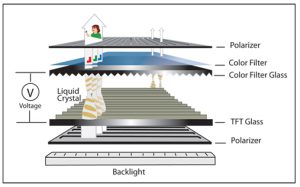
Panel technology determines how a display generates images and directly affects color accuracy, contrast, viewing angles, and response time.
-
IPS (In-Plane Switching) panels are commonly used in professional applications where color consistency and wide viewing angles are important, such as medical devices, design workstations, or public information displays.
-
VA (Vertical Alignment) panels provide better contrast and color reproduction than TN panels, with moderate viewing angles, making them suitable for general-purpose monitoring.
-
TN (Twisted Nematic) panels have fast response times but limited viewing angles and weaker color reproduction. They are generally used only in cost-sensitive or specific industrial applications.
Choosing the right panel type depends on the application requirements—whether color accuracy, viewing angles, or response speed is most critical.
Part 3: Practical Applications of Monitor Size in Industrial Displays
The table below shows how determining monitor size fits into the overall process of selecting the right display specifications for different industrial applications.
| Application Scenario | Key Priority | Recommended Specs Focus | Industrial Solution Path |
|---|---|---|---|
| Factory Floor HMI / Control Panel | Reliability, Longevity, Readability under harsh light | Size & Resolution: 10.1″ to 15.6″ with balanced resolution (e.g., 1280×800). Panel: Rugged IPS for wide viewing and stability. Brightness: 500+ nits to combat glare. |
Standard Industrial TFT Displays from a reliable manufacturer, designed for 24/7 operation and extended life cycles. |
| Medical & Diagnostic Device | Color Accuracy, Consistency, High Reliability | Panel: Medical-grade IPS with precise color calibration. Resolution: High PPI for detail (e.g., FHD on 12.1″). Customization: May require optical bonding to reduce glare. |
Fully custom TFT displays tailored to meet stringent medical safety standards and performance requirements. |
| Outdoor Payment Kiosk or Signage | Visibility in Direct Sunlight, Environmental Durability | Brightness: High-brightness displays (1000+ nits) are essential. Durability: Optical bonding, wide temperature range. Panel: IPS for consistent viewing in outdoor conditions. |
High Brightness TFT Series specifically engineered with enhanced backlights and protective treatments. |
| Compact Embedded Device | Space Constraints, Power Efficiency, System Integration | Size: Compact form factor (3.5″, 5.0″, 7.0″). Integration: Designed to pair seamlessly with Embedded SBCs (Single Board Computers). Customization: Tailored interfaces (FPC cables, connectors). |
Small-form-factor displays offered as part of a complete hardware solution with compatible embedded boards. |
The Customization Imperative
In many projects, standard displays may not meet all requirements. In these cases, custom TFT panels can provide solutions:
- Custom Form Factors: Displays can be built with non-standard sizes, shapes, or thinner profiles to fit specific enclosures.
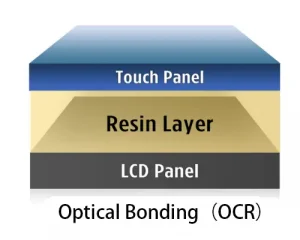
- Improved Readability: Optical bonding, which laminates the cover glass to the LCD, is often used for high-brightness outdoor panels to reduce glare and condensation.
- Operation in Extreme Environments: Panels can be designed to work reliably in wide temperature ranges, for example from -30°C to 85°C, suitable for industrial or automotive applications.
Conclusion
Knowing how to determine monitor size is the first step in selecting the right display. Using the model number when possible ensures an accurate starting point.
Once the size is known, it should be considered together with resolution, refresh rate, and panel technology to select a display that fits both physically and functionally for the project.
Whether a standard industrial TFT display is sufficient or a fully custom solution is needed, applying this approach helps ensure the display meets the application requirements for performance, reliability, and usability.