Let’s be frank: how do you find the LCD for your product isn’t a simple search—it’s a critical engineering and procurement mission. The right screen elevates your device; the wrong one becomes a costly anchor. This guide walks you through the nuanced process to choose the right LCD display, blending hard technical logic with the practical realities of building something real. We’ll cut through the spec sheets and supplier jargon to land a genuinely cost-effective LCD display.
Phase 1: Blueprinting – Translating Vision into LCD Screen Specifications
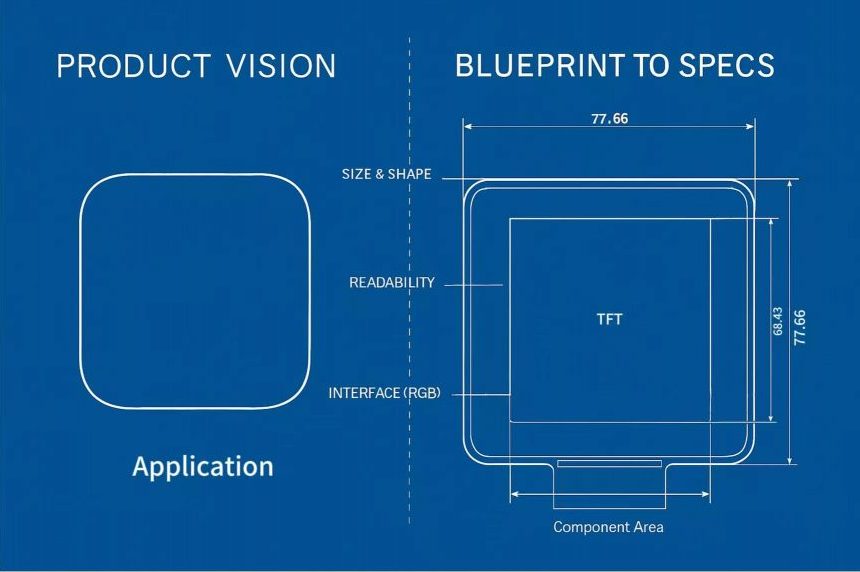
Before contacting a single supplier, you need a blueprint. This document, your Product Requirements Document (PRD), is your north star. It moves you from a vague idea to a target list of concrete LCD screen specifications.
-
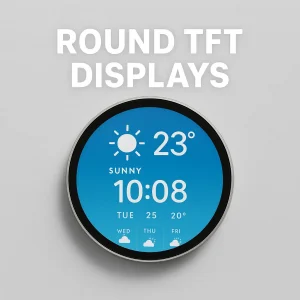
Size & Shape: This is dictated by industrial design, but it immediately segments the market. Sourcing a 2.1-inch round TFT display for a smartwatch isn’t just buying a small screen—it’s entering the realm of custom glass cutting and specialized drivers, which impacts both cost and your pool of potential suppliers. Conversely, a 4-inch square display for a thermostat is a commodity part; here, the game is optimizing other specs for a cost-effective LCD display.
-
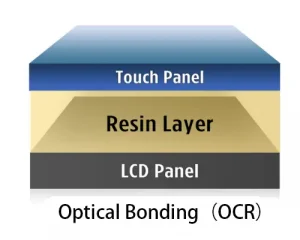
Readability & Ruggedness: Will it live on a sunny dashboard or in a dim bedroom? A 10.1-inch display for an outdoor monitor might demand 1000+ nits brightness and an optical bonded cover glass to defeat glare. The medical 7-inch vertical screen for an infusion pump needs a wide viewing angle so readings are clear from any stance, and an interface that won’t flinch in an EMI-noisy hospital room.
The Connectivity Conundrum: It’s All About the Handshake
The interface is where your display meets your brainboard. This choice, a cornerstone of your LCD screen specifications, has lasting ripple effects.
For that medical pump, a MIPI interface is often the professional’s choice over older parallel RGB. Why? It’s a cleaner, lower-EMI differential signal—think of it as a shielded conversation versus shouting across a busy room. It simplifies layout and boosts reliability. Specifying this early automatically filters your LCD supplier selection to more technically capable partners.
| Product Application | Typical Size/Type | Core Specification Focus | Key Decision & Value Consideration |
|---|---|---|---|
| Smartwatch | 2.1-inch Circular | High PPI (>300), Ultra-low power, Circular driving | High Customization: Involves non-standard cutting and drivers. Suppliers need engineering capability. An integrated module is often key to a cost-effective LCD display. |
| Home Thermostat | 4-inch Square | Wide Viewing Angle (IPS), Indoor Brightness (~250 nits), Standard Module | Cost-Effectiveness & Usability: As a commodity part, the focus during LCD supplier selection is balancing reliability and cost for stable long-term supply. |
| Medical Infusion Pump | 7-inch Vertical Portrait | Wide Viewing Angle, High Reliability, MIPI Interface, Medical Certifications | Risk Mitigation & Compliance: Interface choice (MIPI) affects noise immunity. Suppliers must provide certifications (e.g., ISO 13485). Choosing the right LCD display takes priority over cost here. |
| Industrial Monitor | 10.1-inch Square | High Brightness (>1000 nits), Wide Temperature Range, Ruggedness | Durability & Total Cost of Ownership: High outdoor brightness requirement drives cost. During LCD supplier selection, rigorously validate MTBF data and performance in extreme conditions. |
Phase 2: The Supplier Shortlist – LCD Supplier Selection as Strategic Sourcing
With a vetted spec sheet, you shift from “what” to “who.” How do you find the LCD now becomes a question of partnership. Your LCD supplier selection process is less about finding a vendor and more about auditing a future collaborator.
Blueprint in Hand, Flexibility in Mind
Once your core blueprint is set, the next move is to engage several potential suppliers. This stage isn’t just about comparing quotes—it’s about comparing LCD screen specifications in action and evaluating the solutions each vendor brings to the table.
Here’s a key insight: if a supplier proposes a viable, cost-effective LCD display that meets most of your criteria but differs in a minor, adjustable design aspect, it’s worth pausing. Sometimes, the most pragmatic path to choose the right LCD display is to adapt your initial design to align with a supplier’s proven, available solution. This collaborative approach—think of it as “engineering teamwork”—can dramatically reduce development time, lower integration risk, and accelerate your product’s journey to market. After all, two heads (or a few good supplier engineers) are often better than one.
-
For Critical Applications (e.g., Medical 7-inch display): Request their ISO certificate. Ask for a documented Failure Mode and Effects Analysis on the display module. A serious player will have this. As one seasoned procurement manager put it, “I need to know their change control process better than I know my lunch order.”
-
For Volume & Durability (e.g., Industrial 10.1-inch display): Demand mean time between failure data and ask for two customer references in similar industries. Can they provide a multi-year supply guarantee for the core components? This due diligence is what separates a true partner from a catalog reseller.
Phase 3: The Business Case – Defining “Cost-Effective LCD Display”
The final decision is a synthesis of engineering and economics. A cost-effective LCD display is judged by its total cost of ownership (TCO), a figure far more insightful than unit price.
-
Integration Cost: Does the display require a separate controller board, or is it an integrated module? The MIPI display might have a higher sticker price but save $1.50 in board real estate and layout complexity.
-
Assembly Cost: Does the 10.1-inch display come with an easy-mount frame? A design that snaps in place is faster and less error-prone than one needing manual alignment and adhesive.
-
Lifetime Cost: A display with a 50,000-hour MTBF for your industrial monitor means fewer field failures, lower warranty costs, and a stronger brand reputation. Paying a 10% premium upfront for a 50% longer lifespan is the very definition of cost-effective.
The Final Gate: Your Go/No-Go Checklist. Before signing, run this final sync:
-
Specs Validated? Have all LCD screen specifications been met or exceeded in our own testing protocols?
-
Supply Chain Vetted? Has our LCD supplier selection process confirmed stability, capacity, and transparency for the product lifecycle?
-
TCO Compelling? Does the analysis show this is the most cost-effective LCD display solution when all project risks and costs are modeled?
-
Partnership Viable? Is this a relationship we can sustain for the next product generation?
The Takeaway:
Answering “how do you find the LCD” is a discipline. It’s a three-act play: first, defining ruthless LCD screen specifications; second, executing a meticulous LCD supplier selection; third, making a value-based decision to secure a cost-effective LCD display. By following this framework, you move from asking the question to owning the solution. Now, open your notebook—what’s the first spec you’re writing down for your project?