PCAP touch, or projected capacitive touch, locates a finger by measuring capacitance changes through a protective cover. The electrodes can sit behind glass, leaving a flat front surface for the operator. Whether that panel works with a particular glove or cover thickness depends on the sensor, controller, and settings supplied with it.
A large on-screen button needs a dependable tap. A slider also needs the contact to remain tracked as the finger moves. Write down those actions before choosing a panel, then repeat them with the gloves and mounting arrangement intended for the product.
How PCAP Touch Works
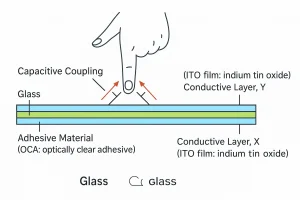
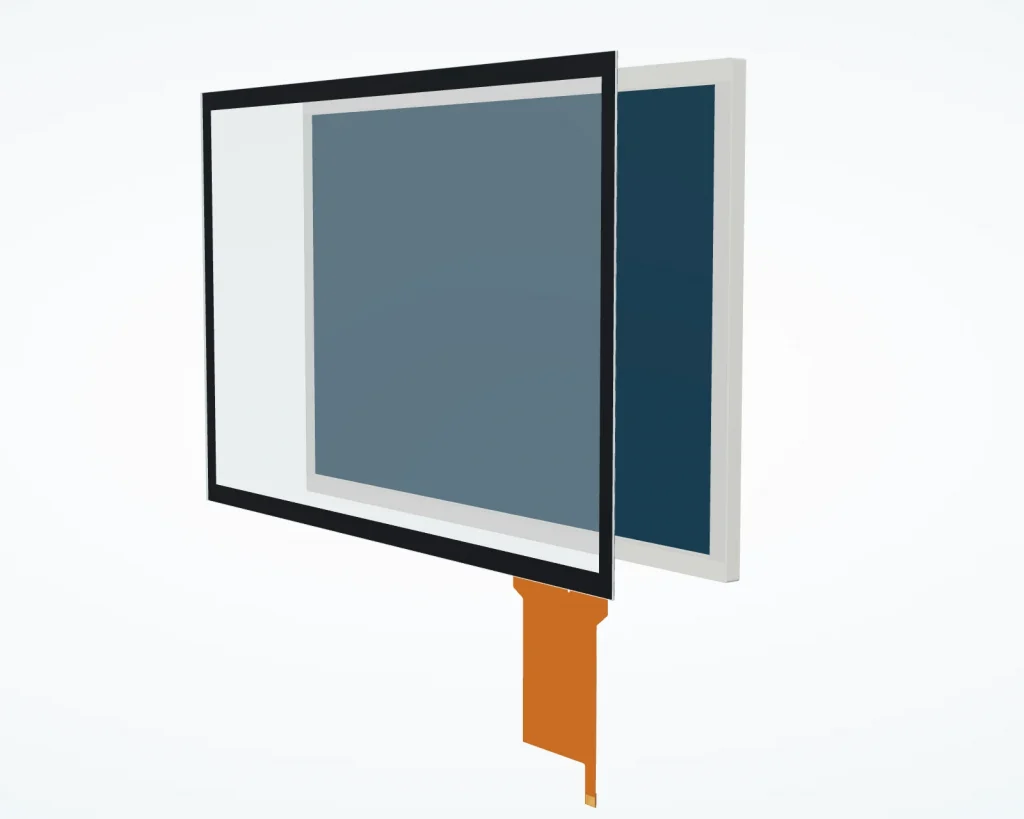
A typical assembly has three distinct functions. The display produces the image, the sensor provides a pattern of conductive electrodes, and the capacitive touch controller measures changes at those electrodes. The controller processes the measurements and sends contact information to the host system, where software maps it to the interface.
In mutual-capacitance sensing, the controller drives transmit electrodes and measures their coupling to receive electrodes. A nearby finger changes that coupling. Scanning the electrode pattern allows the controller to estimate contact positions and distinguish multiple touches within the design’s limits.
Self-capacitance sensing measures an electrode’s capacitance relative to ground. Some controllers use both methods to support different operating conditions. The sensing method alone does not establish glove support or the number of simultaneous contacts; those depend on the complete implementation.
The finger does not need to make electrical contact with an exposed electrode. Capacitive coupling through an insulating cover enables the sensor to sit behind glass, although the cover’s material and thickness affect the available signal.
Choosing Between Projected Capacitive and Resistive Touch
Conventional resistive panels detect pressure that brings conductive layers together. This makes them useful when operators use ordinary nonconductive pointing tools or gloves. The comparison below describes typical implementations; confirm the capabilities of the actual panel and controller.
| Selection factor | PCAP touch | Conventional resistive touch |
|---|---|---|
| Input mechanism | Detects capacitance changes without requiring layer deformation. | Requires pressure to bring sensing layers into contact. |
| Gloves and tools | Glove material, thickness, and stylus compatibility need verification. | Accepts pressure from gloves or suitable blunt tools. |
| Multiple contacts | Commonly supports multi-touch; verify the specified contact count. | Commonly single-touch; specialized controllers offer additional capabilities. |
| Front surface | Can operate behind a continuous rigid cover lens. | Needs a surface that transmits pressure to the sensing layers. |
For a machine operated with a plastic probe, resistive input may simplify the requirement. For an interface using pinch and rotation gestures behind a glass front, projected capacitive sensing is a practical candidate.
What Changes PCAP Touch Performance?
Cover glass and the sensor stack
A PCAP touch panel that works with one cover may need different settings after the cover changes. Increasing the distance between the finger and electrodes generally weakens coupling. An air gap between the cover and sensor can reduce the signal even if the glass itself is no thicker.
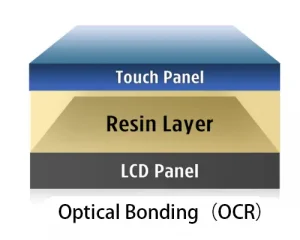
On the stack drawing, identify the gap between the cover and sensor separately from the gap between the sensor and display. The first affects coupling from the finger; the second can affect interference from the display. Give the supplier both dimensions before approving the cover design.
Gloves, droplets, and wet fingers
Specify the actual glove. A glove adds material and separation between the finger and sensor, so thickness, fit, and material matter. A successful test with a thin disposable glove does not qualify a thick work glove, particularly when the final cover lens also reduces the available signal.
Droplet rejection, wet-finger tracking, and operation under flowing water need separate checks. Define which behavior the product actually requires. After raising sensitivity to recover missed contacts, leave the wet screen untouched as part of the same test: the setting must also avoid reporting contacts when nobody is touching it.
Electrical noise after installation
The touch controller measures small capacitance changes near other active electronics. Display circuitry and power supplies can introduce interference. If false contacts appear after installation, review the ground connections and cable routing, then check the sensor’s exposure to the display and nearby switching circuits. Filtering or shielding changes should be After changing a filter or shield, repeat the gestures and glove checks that the panel previously passed.
As a hypothetical example, a panel may work on battery power but report false contacts with a charger connected. Repeat the test with the mounting and firmware unchanged. If the fault follows the charger connection, investigate the supply and ground paths before changing touch settings. Capture diagnostic data from the controller where available.
What to Confirm Before Ordering Samples
For a PCAP touch panel, give the supplier a short, testable requirement rather than requesting only a screen size. Include:
- Mechanical fit: Active area, cover dimensions, layer thicknesses, mounting clearances, and connector location.
- Operator input: Required contact count, glove samples, pointing tools, and the actual gestures used.
- Exposure: Expected moisture, cleaning method, and operating temperature range.
- Electronics: The capacitive touch controller model, configuration version, supply requirements, and touch interface.
- Host integration: Driver availability, coordinate orientation, startup behavior, and recovery after suspend.
Treat video and touch as separate integration paths. Touch reports may travel over USB or I2C while image data uses a separate display connection. Confirm the touch protocol and host driver as well as the connector. An image appearing correctly does not confirm that touch reports reach the application.
For sample acceptance, define the permitted position error, missed inputs, and false activations under named conditions. Include an untouched-screen check: a panel must remain quiet when nobody is using it. Keep the assembly and firmware versions with the results.
Rocktech’s custom TFT display solutions include touchscreen, cover-lens, and bonding options. Provide the stack drawing and operating requirements when discussing a configuration, so the proposed sample represents the intended product.
FAQ
Is PCAP touch the same as capacitive touch?
PCAP is a type of capacitive sensing. Projected capacitive touch uses patterned electrodes to detect capacitance changes through a cover. The broader capacitive category also includes surface-capacitive technology, which uses a different sensing arrangement. A specification that says only “capacitive” leaves the sensing architecture and supported input functions unclear.
Does wet-finger support mean the display is waterproof?
No. Wet-finger support describes touch detection under specified surface conditions. Protection against water entering the equipment depends on the enclosure, seals, connectors, and assembly. Request separate evidence for wet-operation performance and the required ingress protection rating. Neither result automatically establishes the other, and both must match the intended installation.
Can an ordinary stylus operate the panel?
A plain plastic stylus generally cannot provide the capacitive coupling expected from a finger. A compatible conductive passive stylus may work, subject to tip size, sensor design, and controller settings. Active pens require explicit support for their technology. Verify the intended pen on the final assembly rather than assuming universal stylus compatibility.
Choose the Assembly You Can Verify
Choose PCAP touch around the operator’s actions and the finished equipment. Once the prototype passes the agreed checks, keep the cover stack and controller configuration tied to the purchased part number. Recheck performance when either changes, even if the screen size and connector stay the same.