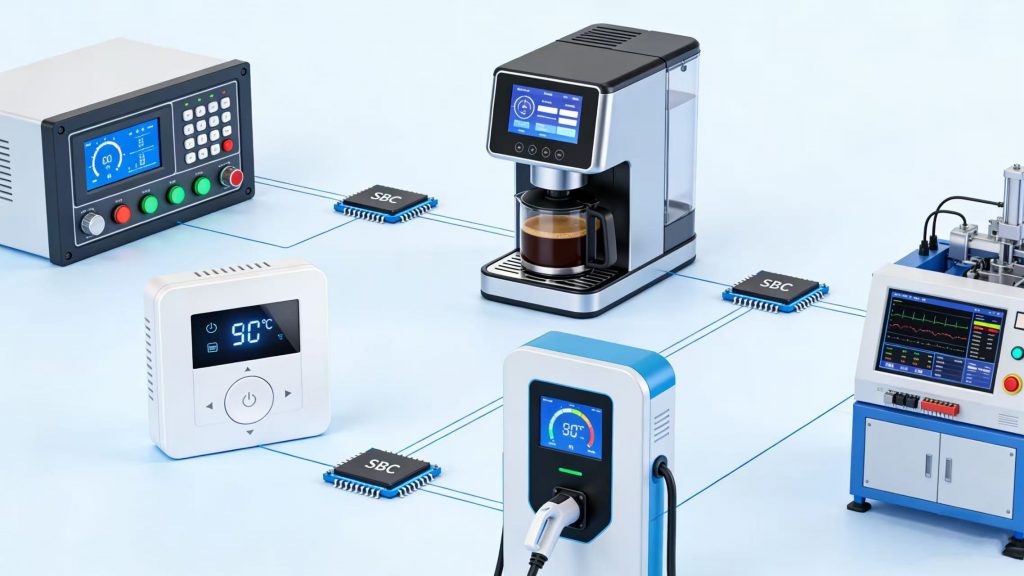
Designing a reliable sbc board computer with an integrated display is not just about selecting components. It involves careful SoC selection, hardware design, software integration, mechanical fitting, and coordination with suppliers. Unlike off-the-shelf development boards, a production-ready sbc board computer must be balanced for performance, cost, long-term availability, and real-world application requirements.
In the following sections, we share how our team develops a customized Android Linux embedded board with an integrated display, covering everything from early design discussions to final mass production.
Building a High-Performance SBC Board Computer on Rockchip SoC
A reliable sbc board computer begins with choosing the right processor platform. In our projects, we mainly work with Rockchip SoC solutions such as RK3566, RK3399, RK3588, and PX30. These platforms are commonly used in control terminals, smart devices, and edge computing equipment.
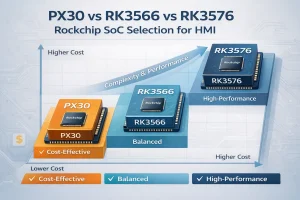
For projects with small to mid-size displays, PX30 is often a practical choice. It offers stable performance at a competitive cost and works well for compact HMIs and control panels where ultra-high computing power is not required. In fact, many of our existing sbc board computer projects are based on PX30. One of our global customers even decided to redesign their hardware platform, moving from NXP i.MX6 to PX30 after evaluating the price-performance balance and long-term stability.
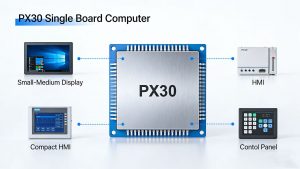
Rockchip SoCs are built on ARM Cortex-A series CPUs and include integrated multimedia engines and GPU acceleration. Depending on the model, they support quad-core or octa-core architectures, Mali GPUs, and hardware video decoding up to 4K. Some platforms also include an NPU for edge AI tasks.
Compared with traditional MCU-based designs, these SoC platforms allow the system to run a full operating system, manage multiple tasks at the same time, and process video more efficiently. The result is a more responsive UI and greater flexibility for future upgrades.
Our boards run either Android or Linux, depending on the project. Android versions typically range from Android 8 to Android 13, based on the chipset. For touch-screen control terminals, Android is often easier because APP development is faster and multimedia support is already mature.
Linux options such as Debian, Ubuntu, or Buildroot are commonly used in industrial automation or projects that require deeper system customization. Many customers prefer Linux when they need more control over drivers, system services, or long-term maintenance.
Both PX30-based boards and higher-performance platforms benefit from active open-source community support. This helps speed up BSP bring-up, driver integration, and application development, especially during early prototype stages.
| SoC | CPU | GPU | Video | AI/NPU | Typical Use Case |
|---|---|---|---|---|---|
| PX30 | Quad-core Cortex-A35 | Mali-400 MP2 | 1080P H.264/H.265 | None | Small/mid-size HMI, compact control panels, cost-sensitive projects |
| RK3566 | Quad-core Cortex-A55 | Mali-G52 | 4K H.265/H.264 | 0.5 TOPS | Industrial terminals, mid-size displays, edge computing |
| RK3399 | Hexa-core Cortex-A72/A53 | Mali-T860 | 4K H.265/H.264 | 2.0 TOPS | High-performance HMI, multimedia-heavy applications |
| RK3588 | Octa-core Cortex-A76/A55 | Mali-G610 | 8K H.265/H.264 | 6 TOPS | Advanced edge AI, large-screen industrial panels |
This combination of computing power, multimedia support, and system flexibility makes the Android Linux embedded board a strong foundation for intelligent control terminals.
Custom HMI Board Design for Industrial Embedded Display Solution
A finished product is not defined by the processor alone. In real projects, the hardware platform must match the application requirements in detail. A custom HMI board combines computing, communication interfaces, and display control into a compact system designed for a specific use case, rather than a generic development setup.
In many projects, our boards are used as control terminals. They communicate with external devices through serial interfaces such as RS232 or RS485, depending on the system design. Customers typically implement their control logic at the Android APP layer or within a Linux application.
This approach avoids the need to develop low-level firmware from scratch and makes system integration more straightforward. By handling control at the application layer, the overall development cycle can be shortened, especially for teams that are more familiar with Android or Linux environments.
Compared with traditional STM32-based control boards, an Android/Linux sbc board computer offers stronger cloud connectivity, multimedia display capability, and better UI experience. It is particularly suitable for systems that require touch-screen interaction, remote monitoring, OTA updates, or data synchronization with cloud platforms.
Typical integrated modules include:
| Functional Block | Purpose |
|---|---|
| Ethernet / WiFi | Network connectivity |
| Bluetooth / 4G | Wireless communication |
| PoE | Power + data integration |
| UART / RS232 / RS485 | Industrial device communication |
| Audio / Speaker / Mic | Voice interaction |
| Camera Interface | Image capture & AI |
| TF Card / USB | Data expansion |
With this architecture, the industrial embedded display solution can be applied in projects such as smart home panels, security monitoring systems, smart lockers, agricultural equipment, industrial control units, and identity registration terminals.
In addition to hardware design, we support BSP development, source code customization, and APP development. ODM/OEM service is also available for customers who require private labeling or product-level integration.
As an official recommended board design partner of Rockchip, and with ongoing open-source community resources, we are able to complete system bring-up efficiently and support long-term product maintenance across different lifecycle stages.
Long-Term Value of a Custom HMI Board
A custom HMI board is not only about technical flexibility. By defining the hardware architecture together with the software framework, the system can be optimized as a complete platform rather than separate modules. Drivers, BSP, and application layers are aligned from the early stage, which reduces compatibility issues during later integration.
From a cost perspective, customization also helps control long-term expenses. Instead of using a general-purpose board with unused interfaces or over-specified components, the design includes only what the project actually requires. This can lower BOM cost, simplify PCB layout, and reduce unnecessary inventory risk.
It is true that a custom HMI board project usually requires a longer development cycle compared with off-the-shelf solutions. Hardware validation, mechanical adjustments, and certification testing all take time. However, once validated, the result is a stable and predictable product platform that supports consistent mass production and easier lifecycle management in the future.
For customers planning medium- to high-volume production, this long-term stability often outweighs the initial development effort.
Project Requirement Definition and Engineering Evaluation of the Custom SBC Board Computer
Each sbc board computer project has its own requirements. In practice, it is unrealistic to create one universal board that fits every interface combination, display size, and mechanical layout.
This is where customization becomes meaningful. Instead of adapting the product to a fixed platform, the hardware can be defined around the actual application — selecting only the required interfaces, matching the exact display specification, and aligning with the mechanical structure from the beginning. This approach helps avoid unnecessary components and reduces later redesign risks.
For this reason, a clear and structured requirement confirmation process is necessary before hardware design begins.
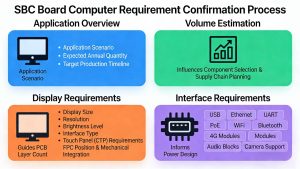
At the start of a project, we usually ask for a clear overview, including the application, expected annual quantity, and target production timeline. Accurate volume estimates help guide component selection and inform supply chain planning, ensuring the sbc board computer can be produced reliably and on schedule.
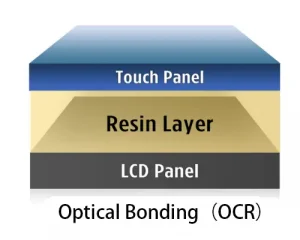
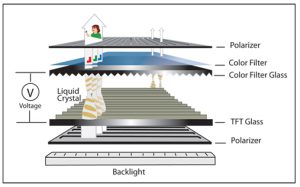
Display requirements must also be defined clearly. This includes display size, resolution, brightness level, interface type, and touch panel (CTP) requirements. Since display FPC position and mechanical integration influence PCB layout, these parameters must be confirmed early.
For the Linux or Android board itself, customers should specify required interfaces such as USB, Ethernet, UART, PoE, WiFi, Bluetooth, 4G modules, audio blocks, or camera support. These elements determine PCB layer count, layout complexity, and power design considerations.
We typically offer two cooperation models.
In Solution 1, we design and supply the entire board including peripheral blocks according to the customer’s mechanical and application requirements. In Solution 2, we only provide a core development board or carrier board, and the customer designs peripheral circuits independently. However, Solution 2 is recommended only for teams already experienced with Rockchip SoC and Android/Linux systems.
In most projects, Solution 1 provides better cost control, reduces engineering adjustments, shortens communication cycles, and ensures system stability.
Step-by-Step Development Process
Developing an Android Linux embedded board with an integrated display follows a clear, step-by-step process. Each stage ensures the hardware and software work smoothly together. We support platforms such as PX30, RK3566, RK3399, and RK3588, depending on the project’s requirements.
Step 1 – Engineering Evaluation & Proposal (1–3 days):
We start by reviewing the project requirements. We confirm feasibility and select the appropriate SoC. For small to mid-size HMIs, PX30 is often ideal. We also outline system architecture and define necessary interfaces. A preliminary solution is proposed for customer review.
Step 2 – Sketch Design & Mechanical Definition (5–7 days):
Customers provide the PCBA outline, mounting holes, LCD/CTP connector positions, and interface locations. Our engineers optimize the layout for board size, connector spacing, and display integration. Mechanical drawings are submitted for approval. This ensures the board fits the enclosure and works with peripheral devices.
Step 3 – Schematic, PCB Layout, Prototype Build & BSP Development (6–10 weeks):
After approval, we create the schematic and PCB layout. Prototypes are manufactured and tested with the display.We check that small to mid-size displays work well and that touch control is responsive. Android or Linux BSP is developed and validated.
Step 4 – Prototype Delivery & Mass Production:
Validated prototypes are shipped to the customer. Once approved, mass production begins. Lead time is usually 8–10 weeks, depending on component availability and factory schedule. Using tested prototypes reduces risks, ensures proper integration, and minimizes post-production adjustments.
Why SBC Board Computer + Display Production Requires such a long time (Q&A)
Q1: Why is the production timeline mainly determined by pre-production preparation rather than assembly quantity?
A:The production cycle of a complete industrial embedded display solution is driven primarily by material preparation and process setup, not by how many units are being assembled. Before manufacturing begins, suppliers must prepare components, fabricate PCBs, and confirm display materials. These steps require fixed lead times that cannot be compressed simply by reducing order quantity.
Q2: What are the main stages in SBC board computer production?
A:Board production typically includes material sourcing, PCB fabrication, SMT assembly, and system debugging together with the display. Among these stages, PCB fabrication alone takes around two weeks or more. Component sourcing—especially for key ICs, DDR, or eMMC—depends heavily on supplier lead times and availability.
Noted: Once PCBs are produced, any design modification may cause them to become unusable. This is why final confirmation before production is critical.
Q3: If we aim to prepare the necessary materials in advance before the final version is released, what risks would there be in starting the production of PCBs prematurely?
A:If PCB production begins before final version’s approval and later changes are required, the entire batch may become obsolete. Premature production can result in PCB or display losses; e.g., 1000 PX30 boards at $5 each → $5,000 potential PCB loss if specs change.
This loss only accounts for bare PCB cost. It does not include component costs, SMT assembly fees, engineering time, or debugging expenses. Therefore, starting production prematurely carries significant financial risk.
Q4: Why is display manufacturing equally complex?
A:Display production involves multiple subcomponents, including backlight units, LCD panels, driver ICs, and custom CTP glass. Each material has its own supplier lead time. If specifications change after production has started, customized CTP modules or panels may become obsolete, resulting in additional cost losses for both parties.
Because display modules are highly customized, version stability is especially important before mass production.
Q5: Why can’t factories start production immediately once engineering is complete?
A:Manufacturing facilities handle multiple projects simultaneously. Production scheduling depends on material arrival, factory capacity, and queue arrangements. Even if engineering validation is finished, production can only begin when all materials are ready and a production slot becomes available.
Q6: What ensures stable mass production of a customized SBC board computer?
A:Each stage—from PCB fabrication to display integration—is closely interconnected. Stable mass production requires strict version control, disciplined process management, and full confirmation of hardware and software specifications before material preparation begins. Equally important are timely customer feedback, careful review of technical drawings, and clear confirmation of specifications at each milestone, which help avoid unnecessary revisions and production delays.
Only with this structured approach can a customized sbc board computer move smoothly from prototype to large-scale production without unnecessary delays or financial risk.
Final Thoughts
Developing a professional sbc board computer with integrated display is not just about hardware assembly. It is a coordinated engineering effort that combines SoC expertise, Rockchip SoC platform support, mechanical planning, software integration, and supply chain management.
By adopting a structured development process and full-solution custom HMI board approach, customers can reduce engineering risk, improve cost control, and ensure long-term product stability.
For companies planning their next industrial embedded display solution, early requirement clarity and close hardware-software collaboration are the true keys to success.